TextScaleControl
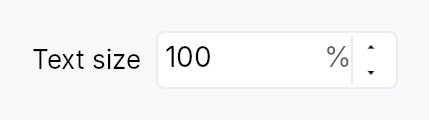
TextScaleControl — the settings control that grows all text in the app.
Drop this into a preferences/settings window to let low-vision users scale
every piece of text uniformly (the framework multiplies the active theme's
typography by the chosen factor — see
WidgetTree::set_user_text_scale).
It is a thin specialization of SpinBox that displays a percent
(80 %–200 %, step 10 %) and, on each edit, both persists the value and
applies it app-wide — so the developer only has to place the widget.
Bind it to the persisted factor signal, typically the settings-backed
teksilo_settings::TEXT_SCALE_KEY:
use teksilo::prelude::*;
use teksilo::widgets::TextScaleControl;

// inside build():
let scale = ctx.settings().signal_for(&teksilo_settings::TEXT_SCALE_KEY);
ctx.add(TextScaleControl::new(scale).label(tr!(text_size())));
Writing the bound signal triggers the SettingsStore's debounced auto-save
(persistence), and the widget's on_value_changed calls
EventContext::set_text_scale
(immediate app-wide application). At startup teksilo-app reads the saved
key and seeds every window, so the chosen size is restored automatically.
Builder methods at a glance
label, tooltip, rich_tooltip, rich_tooltip_content, composite_tooltip
API reference
📖 Full rustdoc API for this module
pub struct TextScaleControl
A specialized SpinBox for the global user text-scale setting.
See the module docs for the persistence + app-wide application
contract. Construct with TextScaleControl::new, optionally attach a
visible label, and place it in a settings view.
#![allow(unused)]
fn main() {
pub struct TextScaleControl { /* fields */ }
}
Methods
pub fn new(factor_signal: Signal<f32>) -> Self
Construct bound to factor_signal (a scale factor where 1.0 = 100 %).
Pass ctx.settings().signal_for(&teksilo_settings::TEXT_SCALE_KEY) to get
automatic persistence; any Signal<f32> works for ad-hoc / preview use.
pub fn label(mut self, label: impl Into<LocalizedString>) -> Self
Attach a visible label placed to the leading side of the spinbox
(e.g. tr!(text_size())). Also used as the control's accessible name.
pub fn tooltip(mut self, text: impl Into<LocalizedString>) -> Self
Attach a plain tooltip that appears after a hover delay.
Clears any previously set rich or composite tooltip (last-call wins).
pub fn rich_tooltip(mut self, key: impl Into<String>) -> Self
Attach a rich tooltip resolved from the app-wide tooltip registry.
key is looked up in the
TooltipRegistry at build time.
Clears any previously set plain or composite tooltip (last-call wins).
pub fn rich_tooltip_content(mut self, content: crate::tooltip::TooltipContent) -> Self
Attach a rich tooltip driven by inline
TooltipContent.
Clears any previously set plain or composite tooltip (last-call wins).
pub fn composite_tooltip(mut self, content: impl Widget + 'static) -> Self
Attach a composite tooltip that hosts an arbitrary widget body.
The content widget is rendered inside the tooltip overlay after the
heavy hover delay. Clears any previously set plain or rich tooltip
(last-call wins).