ShortcutSettings
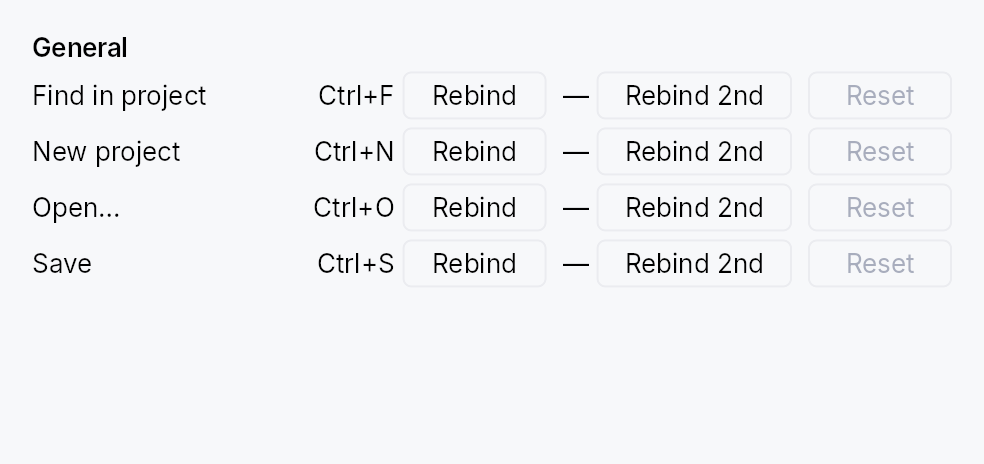
ShortcutSettings — user-facing widget for browsing and rebinding application shortcuts.
Reads every shortcut registered in the tree's
ShortcutRegistry and
renders one row per entry, grouped by category, with both primary
and secondary keystrokes independently rebindable. Supports:
- Rebind (primary or secondary) via one-shot key capture.
- Unbind a slot explicitly (sets the override to
None), or pressDelete/Backspaceduring capture. - Reset clears the user override entirely, restoring the declared defaults. Disabled when no override exists.
- Conflict auto-resolution: rebinding to a keystroke already bound elsewhere silently unbinds the conflicting shortcut so there's always exactly one binding per chord.
- Escape during capture cancels without committing.
- Platform-aware keystroke labels via
format_keystroke.
The widget owns the currently-armed CaptureHandle; dropping
the widget cancels the capture, so navigating away mid-rebind
cannot leak a stray rebind onto the next keystroke pressed
somewhere else in the app.
// Inside a settings Dialog build():
let filter = ctx.signal(String::new());
ctx.add(
    ShortcutSettings::new()
        .with_filter(filter)
        .confirm_conflicts(true)
        .on_conflict(|c| println!("displaced: {}", c.displaced_name)),
);
Builder methods at a glance
with_filter, confirm_conflicts, on_conflict
API reference
📖 Full rustdoc API for this module
pub struct ShortcutConflict
Describes a rebind that collides with an existing binding.
Passed to the ShortcutSettings::on_conflict callback so the app
can surface a toast ("Save lost its Ctrl+S binding"); also used
internally to drive the optional inline confirm prompt.
#![allow(unused)]
fn main() {
pub struct ShortcutConflict { /* fields */ }
}
pub struct ShortcutSettings
A settings panel for browsing and rebinding application shortcuts.
Reads every Shortcut in the tree's ShortcutRegistry, groups rows
by category, and renders primary + secondary keystroke slots with
Rebind, Unbind, and Reset controls. See the module-level docs for the
full feature list.
#![allow(unused)]
fn main() {
pub struct ShortcutSettings { /* fields */ }
}
Methods
pub fn new() -> Self
Create a settings panel that lists every shortcut currently
registered in the tree's ShortcutRegistry, without a filter.
pub fn with_filter(mut self, filter: Signal<String>) -> Self
Bind the visible row set to a filter signal. The widget
shows only shortcuts whose name, id, or category
contains the filter text (case-insensitive). Empty string =
show everything.
Apps typically drive this from a TextInput elsewhere in
their settings UI; keeping the filter external keeps this
widget's own surface minimal rather than embedding a search box.
pub fn confirm_conflicts(mut self, yes: bool) -> Self
Require explicit confirmation before a rebind unbinds a conflicting shortcut. Off by default — the chord is reassigned immediately (the historical behavior). When on, a colliding rebind shows an inline "already assigned to X — Reassign / Cancel" prompt on the row, and the registry is left untouched until the user confirms.
pub fn on_conflict(mut self, f: impl Fn(&ShortcutConflict) + 'static) -> Self
Register a callback fired whenever a rebind collides with an
existing binding — regardless of confirm_conflicts. The
callback receives the displaced shortcut's id, name, and the
chord, so the app can surface a toast ("Save lost its Ctrl+S
binding"). It fires before the displaced binding is removed (in
confirm mode, before the user has confirmed).